The FILESTREAM features is a new one in SQL Server 2008. It allows you to save a BLOB file on the physical hard disk instead of storing the binary data within the database (which results in large database file size). I have much tried out this new feature, but found an interesting article on Microsoft TechNet.
Thursday, June 11, 2009

Fuzzy Match / Grouping (Jaro Winkler)
Browsing through SQLServerCentral.com, I came across this artice regarding implementation of Fuzzy Matching and Grouping using Jaro Winkler method. Seems pretty promising. I am posting this for future reference.
Roll Your Own Fuzzy Match / Grouping (Jaro Winkler) - T-SQL
By Ira Warren Whiteside
Comparing Table Variables with Temporary Tables
I always get confused on whether to use Table Variable or Temporary Tables. Both seem to give similar functionalities. In some situations such as User-defined Function, you have no other option but to choose Table Variable.
Anyway, a good comparison on this would be great. I found this great article on SQLServerCentral.com by Wayne Sheffield comparing both method. Keeping it for future reference.
Thursday, March 12, 2009
TIME data type in SQL Server 2008
SQL Server 2008 has introduced the TIME data type to store Time without the Date. Before SQL Server 2008, we had to use the DATETIME data type to store Time only data, which was an absolute waste.
Usage of this data type is quiet straight forward.
DECLARE @tm TIME
SET @tm = '12:34:56.1234'
It accepts most common time formats in string format. Assigning a normal DATETIME data to TIME data type is also possible, in which case, only the Time part of the DATETIME data will be stored.
You can also provide an accuracy value for the data type while declaring:
DECLARE @tm TIME(5)
SET @tm = '12:34:56.1234567'
PRINT @tm
-- Output: 12:34:56.123457
The default accuracy is 7 digits. But depending on the application of the data type, you can even set it to 0.
Technorati Tags: SQL Server,timedel.icio.us Tags: SQL Server,time
Wednesday, March 11, 2009
SQL Server 2005 Paging – The Holy Grail
The paging and ranking functions introduced in 2005 are old news by now, but the typical ROW_NUMBER OVER() implementation only solves part of the problem.
Nearly every application that uses paging gives some indication of how many pages (or total records) are in the total result set. The challenge is to query the total number of rows, and return only the desired records with a minimum of overhead? The holy grail solution would allow you to return one page of the results and the total number of rows with no additional I/O overhead.
In this article, we're going to explore four approaches to this problem and discuss their relative strengths and weaknesses. For the purposes of comparison, we'll be using I/O as a relative benchmark.
Wednesday, August 6, 2008
Getting Row Numbers in SQL Server
Quiet rarely, you might come upon a need to create a sequential numbering of all the rows within a query result set. I believe, both MS SQL Server and MySQL do not support row numbering. In Oracle, there is a function called ROW_NUMBER (if my memory is correct) to return the row number.
In the age of RDBMS, the concept of Row Numbers does not make much sense, because there is no specific ordering of tables. It is more correct to say that "Row Number" is the position of a row within a given query resultset.
Searching the net, I found lots of ways to number the resultset. Most of these contain very complex techniques. But, the best method is to iterate the result set (through program or stored procedure, depending on your need) and add row numbering.
Here I am going to discuss a simple technique using COUNT function. This is probably not the best way to do it. But for small tables, I guess this would do fine.
Lets take the table:
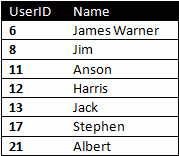
The technique I will be discussing here will only be useful for query results "ordered" on some column. Also, for performance, it should be ordered on an indexed numeric field.
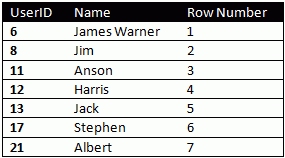
In our example, the table is ordered on the UserID field. To get the row number of the first row, we run a COUNT(*) sub-query with condition that UserID <= 6. The result would naturally be 1. Similarly, COUNT(*) with UserID <=8 will return 2. Writing the whole thing into a single query:
Select UserID, Name, (Select Count(*) From Users Where UserID <= usr.UserID)
From Users
The query should return:
What Next?
In the next installment of this topic, I will be discussing about using row numbering within grouped data.
In the age of RDBMS, the concept of Row Numbers does not make much sense, because there is no specific ordering of tables. It is more correct to say that "Row Number" is the position of a row within a given query resultset.
Searching the net, I found lots of ways to number the resultset. Most of these contain very complex techniques. But, the best method is to iterate the result set (through program or stored procedure, depending on your need) and add row numbering.
Here I am going to discuss a simple technique using COUNT function. This is probably not the best way to do it. But for small tables, I guess this would do fine.
Lets take the table:
The technique I will be discussing here will only be useful for query results "ordered" on some column. Also, for performance, it should be ordered on an indexed numeric field.
In our example, the table is ordered on the UserID field. To get the row number of the first row, we run a COUNT(*) sub-query with condition that UserID <= 6. The result would naturally be 1. Similarly, COUNT(*) with UserID <=8 will return 2. Writing the whole thing into a single query:
Select UserID, Name, (Select Count(*) From Users Where UserID <= usr.UserID)
From Users
The query should return:
What Next?
In the next installment of this topic, I will be discussing about using row numbering within grouped data.
Tuesday, July 29, 2008
Free Domain Names..................
Want to create your own presence on the internet? But cant afford heavy charges domain? Get a cool CO.CC domain:

Subscribe to:
Posts (Atom)