In the age of RDBMS, the concept of Row Numbers does not make much sense, because there is no specific ordering of tables. It is more correct to say that "Row Number" is the position of a row within a given query resultset.
Searching the net, I found lots of ways to number the resultset. Most of these contain very complex techniques. But, the best method is to iterate the result set (through program or stored procedure, depending on your need) and add row numbering.
Here I am going to discuss a simple technique using COUNT function. This is probably not the best way to do it. But for small tables, I guess this would do fine.
Lets take the table:
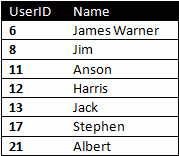
The technique I will be discussing here will only be useful for query results "ordered" on some column. Also, for performance, it should be ordered on an indexed numeric field.
In our example, the table is ordered on the UserID field. To get the row number of the first row, we run a COUNT(*) sub-query with condition that UserID <= 6. The result would naturally be 1. Similarly, COUNT(*) with UserID <=8 will return 2. Writing the whole thing into a single query:
Select UserID, Name, (Select Count(*) From Users Where UserID <= usr.UserID)
From Users
The query should return:
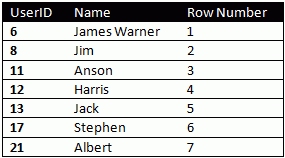
What Next?
In the next installment of this topic, I will be discussing about using row numbering within grouped data.

